I Tried Every Way to Scrape Amazon in 2026. Here's What Actually Works.
Every year, someone publishes a fresh Python tutorial for scraping Amazon. Every year, it stops working in about three weeks.
I know because I've read most of them — and I've watched the same pattern repeat: Requests + BeautifulSoup gets you a CAPTCHA. Selenium gets you rate-limited. Playwright lasts a bit longer until Amazon fingerprints your headless browser. Then someone updates the tutorial with a new workaround, and the cycle starts again.
This post isn't a Python tutorial. It's a post-mortem on why they all fail, and what I'm actually using now.
Why Amazon Scraping Is Different
Amazon runs one of the most aggressive bot-detection stacks in e-commerce. The short version:
IP reputation checks. Cloud IPs (AWS, GCP, proxies) are flagged before your first request lands. If your scraper runs in the cloud, you're starting at a disadvantage.
Browser fingerprinting. Headless Chrome leaves signatures — missing browser APIs, inconsistent canvas hashes, no GPU rendering. Amazon's detection reads these signals and throttles or CAPTCHAs you within minutes.
Behavioral analysis. Scrapers navigate pages too fast, too consistently, too linearly. Amazon's ML models have seen millions of bot sessions. Yours is not novel.
Data poisoning. This one is underrated. Amazon sometimes serves scrapers plausible-but-wrong data — different prices, modified availability, shuffled product details. Your scraper succeeds, returns 200s, and you never know the data is wrong until you act on it.
What the Tutorials Get Wrong
Most Amazon scraping tutorials solve the wrong problem. They focus on getting past the block — better proxies, smarter headers, rotating user agents. These are arms-race solutions. Amazon invests more in detection than any tutorial author invests in evasion, so you're always playing catch-up.
The actual problem is simpler: you're making requests from outside a real browser session.
Amazon can tell the difference between a real Chrome window with your logged-in session, cookies, browsing history, and GPU fingerprint — and a programmatic HTTP client pretending to be one. The gap between these two things is where every scraper gets caught.
The Approach That Actually Works
Browser-native scraping. You run the scraper inside your real browser, using your real session, on your real machine. From Amazon's perspective, it looks like you — because it is you.
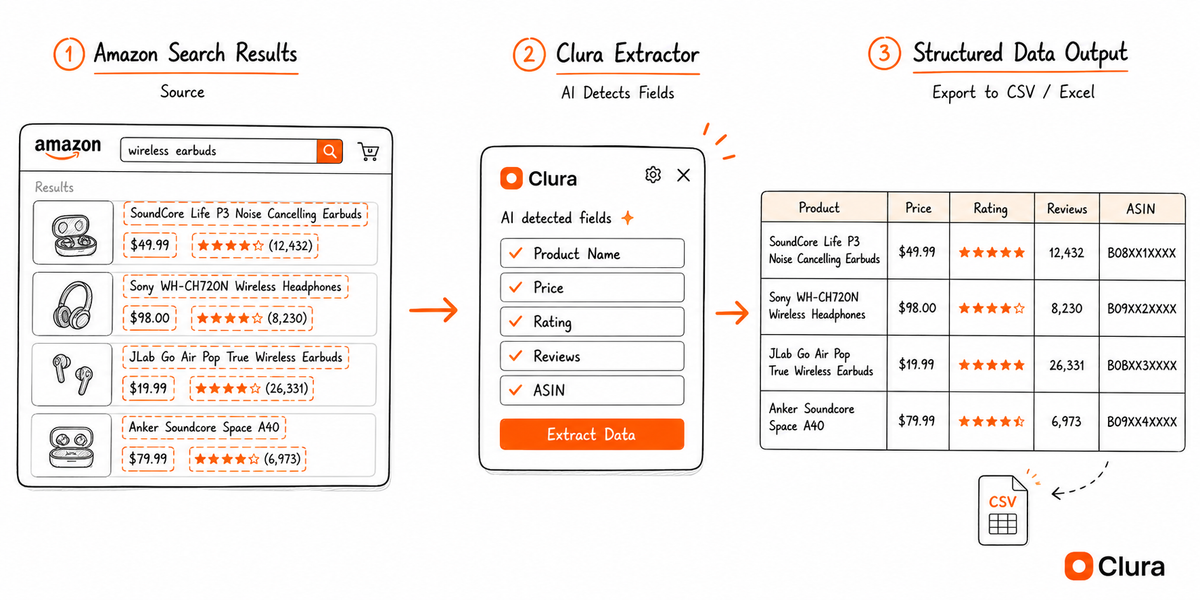
I've been using Clura for this. It's a Chrome extension that adds a side panel to any page. You navigate to an Amazon search results page, ASIN listing, or category — and it extracts the structured data directly from the DOM your browser already rendered.
The workflow for a product research dump:
- Install the Chrome extension
- Navigate to any Amazon search results page (or category, or seller page)
- Open the Clura side panel — it auto-detects the repeating product grid
- Click Extract → get title, ASIN, price, rating, review count, availability in a table
- Export to CSV
That's it. No API key. No proxy rotation. No rate limit headaches. The page loads at human speed, in your real session. Amazon sees a normal browsing session.
What You Can Scrape This Way
Product listings — title, ASIN, price (current + original), star rating, review count, availability, Prime badge, seller name. Works on search results, category pages, bestseller lists.
Product detail pages — full description, all variants (size, color, style), feature bullets, images, dimensions, shipping details, seller information.
Price history context — current price vs. "was" price, deal badges, coupon availability. Useful for price monitoring workflows.
Seller pages — storefront products, feedback rating, response rate. Useful for competitive intelligence.
Reviews — title, body, verified purchase flag, rating, date. Works on individual product review pages.
The Limits (Be Honest With Yourself)
This approach scales to what a human could plausibly browse. If you need to scrape 50,000 ASINs overnight, this isn't it — use a real proxy infrastructure and accept the maintenance cost.
The sweet spot is research-scale scraping: competitor analysis, price monitoring for a specific category, product research for a niche, building a dataset for a side project. Hundreds to low thousands of records, not millions.
For most people reading this, that's exactly what they need. They're not building a price intelligence platform for a Fortune 500. They're trying to pull competitor prices for 200 SKUs without writing a Python script that breaks every month.
A Quick Note on Amazon's ToS
Amazon's ToS prohibits automated access. So does nearly every major website. Browser-native scraping with a Chrome extension sits in a grayer area than cloud scrapers, but you should still be aware of the policy and use scraped data responsibly. Don't hammer their servers. Don't republish their product catalog. Use it for research, not redistribution.
The Honest Summary
If you need to scrape Amazon for research:
- Python + requests: Fails immediately on most pages. Not worth starting.
- Selenium/Playwright (cloud): Works briefly, then gets fingerprinted. High maintenance cost.
- Residential proxies + headless browser: Works longer, costs money, still breaks. Right choice for large-scale production use.
- Browser-native Chrome extension: Works reliably for research-scale extraction. Zero setup, no maintenance. Not for mass scale.
Pick the tool that matches your actual scale. For most people doing product research, competitor analysis, or price monitoring on hundreds of SKUs — the Chrome extension wins on every dimension except raw scale.